
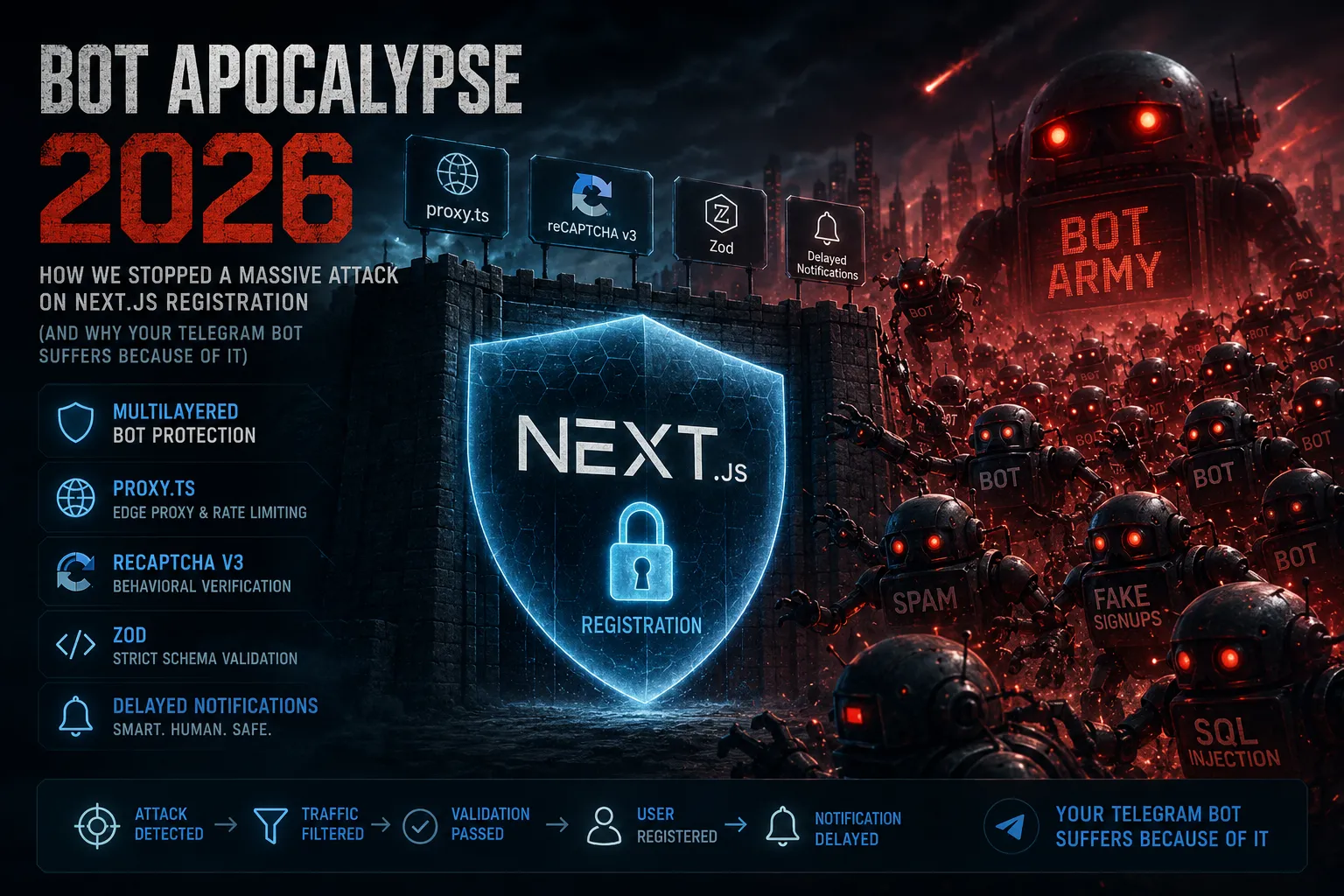
Bot Apocalypse 2026: How We Stopped a Massive Attack on Next.js Registration (and Why Your Telegram Bot Suffers Because of It)
Sounds familiar? You wake up, grab your phone, open Telegram - and find 500 notifications about new user registrations. Names like adflkj123, emails like sdfg@mail.ru, and all of it happened overnight. Your bot is blowing up, your heart rate spikes, because you realize: your project is under attack.
This isn't just spam. It's "dirty" traffic that bloats your database, destroys your email sender reputation, and forces your server resources to spend cycles on garbage requests. In 2026, these wild botnets have become much smarter than your average junior developer. They can render JS, bypass basic checks, and hammer your API from hundreds of different IP addresses simultaneously.
When this happened on my projects, I realized one thing: standard defense methods are dead. A simple check like "are the fields filled" is like trying to stop a train with a cardboard wall.
Why Your "Defense" No Longer Works
We used to think that checking a honeypot field or setting up basic validation was enough. But modern bots utilize LLMs to solve captchas and rotating proxy networks to bypass rate limits. They don't just knock on your doors-they try to take them off the hinges.
When your Telegram bot alerts you about every single registration, it stops being a helpful assistant and becomes an indicator of your system's agony. Ignoring this means letting bots drain your resources and corrupt the analytics you gather so meticulously for your Next.js project.
Our Strategy: The Multi-Layer Shield
We didn't build a single complex defense mechanism. Instead, we built a "multi-layer shield" where each tier eliminates a specific type of threat:
Honeypot protection: Cutting off basic script bots right at the form level.
Google reCAPTCHA v3: Using behavioral score analysis to determine whether it's a human or an automated script, without even showing a captcha challenge to the user.
Edge Rate Limiting (proxy.ts): Blocking suspicious IPs before the request even hits your main Node.js server.
Backend Verification: Prisma and Server Actions validation-the final frontier where we block registrations even if "something" managed to slip past the outer defenses.
In this article, I'll show you how we turned registration from a wide-open gate into a fortress that even professional spam farms couldn't breach. No fluff-just a defense architecture you can deploy in a single evening.
Bot Filtering at the Server Actions Level (register.ts)
Middleware (proxy.ts) is our first line of defense. But the second line is Server Actions. This is exactly where we halt bots capable of mimicking API requests. We don't just blindly accept data; we pass it through a validation sieve.
The primary pain point for many developers is blindly trusting FormData. Instead, we use Zod for strict validation and reCAPTCHA v3 for behavioral assessment.
// src/lib/actions/register.ts
'use server'

import { z } from 'zod'
// ... (imports)

const signupSchema = z.object({
  username: z.string().min(2).max(50).regex(/^[a-zA-Z0-9_]+$/),
  email: z.string().email(),
  password1: z.string().min(6),
})

export const register = async (values: FormData) => {
  // 1. Honeypot: If the hidden field is filled, it's a bot
  const honeypot = values.get('website')
  if (honeypot) return { success: '...' } // Stay silent to avoid giving a hint

  // 2. reCAPTCHA v3: If score < 0.7 - block
  const recaptchaToken = values.get('recaptchaToken') as string
  const recaptchaRes = await fetch(`.../siteverify?secret=${process.env.RECAPTCHA_SECRET_KEY}&response=${recaptchaToken}`, { method: 'POST' })
  const recaptchaData = await recaptchaRes.json()

  // If Google rejected the token (bot or expired)
  if (!recaptchaData.success || recaptchaData.score < 0.7) return { error: 'Bot detected!' }

  // 3. Zod validation (cut off injections and invalid formats)
  // ... (validation logic via Zod)

  // 4. Registration only after passing all filters
  await auth.api.signUpEmail({ ... })

  // 5. Only HERE we generate the token and send the email
  const verificationToken = await generateVerificationToken(email)
  await sendVerificationEmail(email, verificationToken.value, name || '')

  return { success: '...' }
}
Telegram Bot as an Indicator, Not a "Spam Bin"
The most crucial moment that saved my sanity was the 幕後 / delayed notification. Previously, my Telegram bot would explode right after a registration request. Now, we trigger the sendTelegramNotification only at the exact moment of email verification inside the verifyEmail function.
If a bot creates an account but fails to verify the email (and it will fail because the email is fake), you won't receive a single alert. Your Telegram channel remains a clean tool for monitoring real clients.
// src/actions/auth.ts (verifyEmail fragment)

export const verifyEmail = async (token: string) => {
  // ... (token and user lookup)

  const isAlreadyVerified = existingUser.emailVerified !== null

  await prisma.user.update({ ... })

  // 🟢 Only here, when a real human clicks the link in the email:
  if (!isAlreadyVerified) {
    try {
      await sendTelegramNotification(existingUser.name || '', existingUser.email || '')
    } catch (e) {
      console.error(e)
    }
  }

  await prisma.verificationToken.delete({ ... })
  return { success: 'Email confirmed!' }
}
The Crucial Final Touch: Environment Configuration (.env)
To get this running smoothly on your VPS, do not forget to move all security keys into environment variables. This acts as our safety fuse against bots.
Create or update your .env file on the server:
# 🟢 Bot Protection
NEXT_PUBLIC_RECAPTCHA_SITE_KEY="6Ld_YOUR_FRONTEND_SITE_KEY"
RECAPTCHA_SECRET_KEY="6Ld_YOUR_BACKEND_SECRET_KEY"

# 🟢 Telegram
TELEGRAM_BOT_TOKEN="your_bot_token"
TELEGRAM_ADMIN_IDS="your_admin_user_id(s)_comma_separated"
TELEGRAM_CHAT_ID="your_telegram_chat_or_channel_id"
Why This Worked
Honeypot eliminates the most basic script-based bots that blindly fill out every single field available in the form layout.
reCAPTCHA v3 filters out "smarter" bots that try to mimic human interactions but fail Google's backend risk assessment and behavior score analysis.
Delayed Notification is our ultimate weapon against bot spam in Telegram. You receive an alert only when a user successfully verifies their email. This guarantees a 100% high-quality contact database instead of ghost accounts.
Verification as the Final Frontier (Verification Page)
Developers often overlook the Loading state and proper error handling during email verification routes. However, bots love to target and exploit these endpoints by flooding them with random tokens. This verification page code (new-verification/page.tsx) serves as an industry standard for how robust frontend architecture should behave.
Using Suspense around useSearchParams is a absolute must-have in Next.js 16 to avoid server-side rendering (SSR) pitfalls, while implementing useRef to track the execution state guarantees that the API verification request fires exactly once-even under React's Strict Mode.
// src/app/[locale]/auth/new-verification/page.tsx
'use client'

// ... (imports)

function VerificationContent() {
  const t = useTranslations('Auth')
  const searchParams = useSearchParams()
  const token = searchParams.get('token')
  const router = useRouter()

  const [error, setError] = useState<string | undefined>(!token ? t('error_title') : undefined)
  const [success, setSuccess] = useState<string | undefined>()
  const [timer, setTimer] = useState(7)

  // 🟢 Prevent duplicate execution (double-tap safety)
  const verificationStarted = useRef(false)

  useEffect(() => {
    if (!token || verificationStarted.current || success || error) return

    verificationStarted.current = true

    const runVerification = async () => {
      try {
        const data = await verifyEmail(token)
        if (data.success) {
          setSuccess(data.success)
        } else {
          setError(data.error)
        }
      } catch (err) {
        setError(t('error_generic'))
      }
    }
    runVerification()
  }, [token, success, error, t])

  // ... (timer and render logic)
}
Why this is great:
Double-call safety:
verificationStartedensures we don't fire duplicate requests to the database, which is critical for performance under heavy load conditions.User Flow: The user doesn't just stare at a blank screen; they see a loading spinner, followed by a clear status (success/error) and an automated redirect timer. This transforms a rigid "technical process" into a pleasant UX.
Clean Code & The reCAPTCHA Hook
We don't want to clutter our components with window.grecaptcha logic. That's a bad practice that complicates testing and code maintainability. Abstracting reCAPTCHA into a custom hook (useRecaptchaToken.ts) is a hallmark of Senior architecture.
This hook not only encapsulates the Google API logic but also resolves script loading conflicts that are often overlooked.
// src/hooks/useRecaptchaToken.ts
import { useCallback, useEffect, useState } from 'react'

interface RecaptchaHook {
  executeRecaptcha: () => Promise<string | null>
  isReady: boolean
}

export const useRecaptchaToken = (action: string): RecaptchaHook => {
  const [isReady, setIsReady] = useState(false)
  const siteKey = process.env.NEXT_PUBLIC_RECAPTCHA_SITE_KEY ?? ''

  useEffect(() => {
    const checkRecaptcha = () => {
      if (window.grecaptcha?.ready) {
        window.grecaptcha.ready(() => { setIsReady(true) })
        return true
      }
      return false
    }

    if (!checkRecaptcha()) {
      const intervalId = setInterval(() => { if (checkRecaptcha()) clearInterval(intervalId) }, 300)
      return () => clearInterval(intervalId)
    }
  }, [])

  const getToken = useCallback(async () => {
    // 🟢 Use optional chaining (?.) to avoid errors on the server or if the script isn't fully loaded
    if (!isReady || !window.grecaptcha || !siteKey) return null

    return new Promise<string | null>((resolve) => {
      window.grecaptcha.ready(async () => {
        try {
          const token = await window.grecaptcha.execute(siteKey, { action })
          resolve(token)
        } catch { resolve(null) }
      })
    })
  }, [isReady, siteKey, action])

  return { executeRecaptcha: getToken, isReady }
}
Final Architectural Summary
Our system now stands as a unified, bulletproof defense mechanism:
At the Proxy Layer: We block IP floods and brute-force attempts via Edge Rate Limiting.
At the UI Layer: We use reCAPTCHA v3 via our custom
useRecaptchaTokenhook for behavioral bot analysis.At the Server Actions Layer: We validate incoming data strictly via Zod schemas and neutralize basic scrapers using a Honeypot field.
At the Database Layer: Only valid, verified users get committed, keeping our Telegram bot silent until a real human actually confirms their identity.
🛠 Final Checklist: Implement This Protection in One Evening
To ensure you don't get lost in the code, here is a step-by-step implementation roadmap for your Next.js 16 project. Treat it like your development checklist:
Step 1: Update environment variables (
.env) Get your Google reCAPTCHA v3 keys, configure your Telegram bot token, and set up your Gmail App Password. The system won't run without these.Step 2: Update the Database Schema (Prisma 7) Add the correct
UserandVerificationTokenmodels. Don't forget to runpnpm prisma generateand apply your migrations.Step 3: Configure the Edge Shield (
proxy.ts) Deploy the in-memoryMaplogic for Rate Limiting. This instantly cuts off 80% of blind spam and brute-force API requests.Step 4: Build the
useRecaptchaTokenHook Abstract your Google reCAPTCHA operations into a clean custom hook. This keeps your layout code decoupled and eliminates potential script hydration errors.Step 5: Add Captcha & Honeypot to the Signup Layout Configure the loading state (Spinner) and keep the submit button disabled until a valid reCAPTCHA token is successfully generated.
Step 6: Write Rock-Solid Server Actions (
register.ts) Use Zod for strict type and character sanitation. Ensure the backend enforces a reCAPTCHA score cutoff (>= 0.7) before allowing database entries.Step 7: Configure Manual Email Dispatches (
mail.ts) Turn off automated verification dispatches within BetterAuth. Usenodemailerexplicitly wrapped in anawaitblock to maintain execution control.Step 8: Decouple Telegram Notifications into
verifyEmailThe ultimate game-changer: disconnect the bot from the registration trigger entirely. The bot must listen exclusively to successful email verifications via token link clicks.Step 9: Establish an Impenetrable Verification Page Use a
useRefguard to prevent double-firing queries during React's Strict Mode. Integrate an automatic countdown redirect to the login view for excellent UX.
Conclusion
Bots are constantly evolving, and legacy defensive workarounds simply no longer cut it. However, by deploying this multi-layered architecture, you transform your Next.js application into an absolute fortress. You keep your database immaculate, maintain an optimal email sender reputation, and most importantly, safeguard your own peace of mind-meaning your Telegram bot will never wake you up at 3 AM due to a massive spam attack again.
Build reliably. Build like an architect!
Коментарі (0)
Leave a comment