
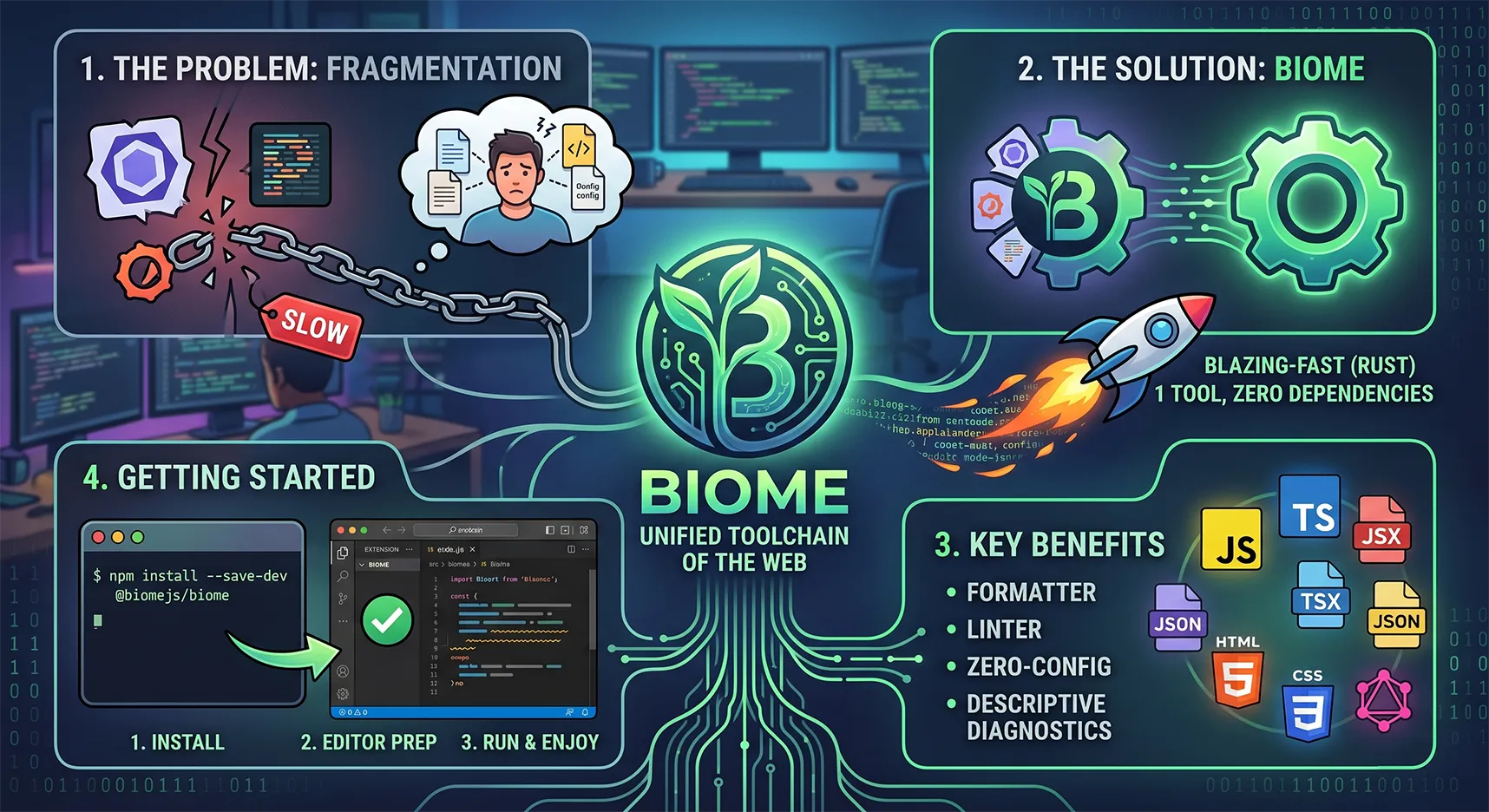
Biome: Вбивця Prettier та ESLint. Як налаштувати найшвидший тулчейн для веб-розробки
Якщо ти пишеш сучасні Fullstack-проєкти на Next.js та TypeScript, ти напевно стикався з класичним болем налаштування лінтерів. Встановити ESLint, додати Prettier, потім поставити плагіни, щоб вони не конфліктували між собою, налаштувати сортування імпортів... У результаті ти отримуєш купу конфігів, важку папку node_modules і затримки при збереженні файлів.
Час забути про цей зоопарк. Зустрічайте Biome — універсальний, блискавично швидкий інструмент, який замінює і ESLint, і Prettier.
Що таке Biome і в чому його профіт?
Biome — це єдиний інструмент (toolchain) для веб-проєктів, який форматує код і перевіряє його на помилки.
Його головні переваги:
Неймовірна швидкість: Biome написаний на Rust. Він форматує та лінтить код у десятки разів швидше за інструменти на Node.js. Затримки при збереженні файлів просто зникають.
Все в одному: Тобі більше не потрібні пакети
eslint-config-prettierчи плагіни для сортування імпортів. Biome вміє все це з коробки.Легке налаштування: Один невеликий файл
biome.jsonзамість хаосу з.eslintrc.json,.prettierrcта інших.Чудова підтримка TypeScript та JSX: Ідеально підходить для розробки на Next.js та React.
Крок 1: Встановлення в проєкті
Встановлюємо Biome як залежність для розробки. Найшвидше і найчистіше це робити через pnpm:
Bash
pnpm add --save-dev --save-exact @biomejs/biome
Після встановлення ініціалізуємо конфіг:
Bash
pnpm biome init
Ця команда створить у корені твого проєкту файл biome.json.
Крок 2: Ідеальний конфіг biome.json
Ось мій перевірений роками конфіг. Він налаштований на 2 пробіли, використання одинарних лапок у JS/TS, подвійних лапок у JSX (React), прибирання зайвих крапок з комою та автоматичне сортування імпортів.
Просто заміни вміст згенерованого biome.json на цей код:
JSON
{
  "$schema": "https://biomejs.dev/schemas/2.4.12/schema.json",
  "assist": {
    "actions": {
      "source": {
        "organizeImports": "on"
      }
    }
  },
  "linter": {
    "enabled": true,
    "rules": {
      "recommended": true
    }
  },
  "formatter": {
    "enabled": true,
    "formatWithErrors": false,
    "indentStyle": "space",
    "indentWidth": 2,
    "lineWidth": 100
  },
  "javascript": {
    "formatter": {
      "quoteStyle": "single",
      "jsxQuoteStyle": "double",
      "trailingCommas": "all",
      "semicolons": "asNeeded"
    }
  }
}
Крок 3: Підготовка редактора коду
Щоб магія працювала непомітно для тебе, потрібно навчити твій улюблений редактор коду форматувати файли за допомогою Biome при кожному збереженні.
Налаштування для VSCode / Cursor
Якщо ти використовуєш VSCode або його AI-форк Cursor, спочатку встанови офіційне розширення Biome. Далі відкрий свої налаштування (settings.json) і додай мій конфіг. Тут вже зібрано ідеальний баланс для розробки, роботи з терміналом, стилізації та інтеграції Biome:
JSON
{
  "emmet.excludeLanguages": ["markdown"],
  "sync.gist": "a15eb3acc26f28548b648dae8021ff61",
  "editor.linkedEditing": true,
  "window.openFilesInNewWindow": "off",

  // 🟢 Налаштування табуляції: 2 пробіли замість табів
  "editor.detectIndentation": false,
  "editor.tabSize": 2,
  "editor.insertSpaces": true,

  "editor.multiCursorModifier": "ctrlCmd",
  "editor.suggestSelection": "first",
  "editor.wrappingIndent": "same",
  "editor.wordWrapColumn": 80,

  "files.associations": {
    "*.html": "django-html"
  },
  "[django-html]": {
    "editor.formatOnSave": false
  },
  "[html]": {
    "editor.defaultFormatter": null,
    "editor.formatOnSave": false
  },

  "editor.renderControlCharacters": false,
  "editor.unicodeHighlight.ambiguousCharacters": false,
  "editor.quickSuggestionsDelay": 0,
  "html.completion.attributeDefaultValue": "singlequotes",

  // Breadcrumbs
  "breadcrumbs.icons": false,
  "breadcrumbs.showFiles": false,
  "breadcrumbs.symbolPath": "off",
  "breadcrumbs.showArrays": false,
  "breadcrumbs.showClasses": false,
  "breadcrumbs.showMethods": false,
  "breadcrumbs.showBooleans": false,
  "breadcrumbs.showFunctions": false,
  "breadcrumbs.showEnumMembers": false,
  "breadcrumbs.showConstructors": false,
  "breadcrumbs.showConstants": false,
  "breadcrumbs.showEvents": false,
  "breadcrumbs.showPackages": false,
  "breadcrumbs.showVariables": false,
  "breadcrumbs.showKeys": false,
  "breadcrumbs.showInterfaces": false,
  "breadcrumbs.showFields": false,

  // Terminal
  "terminal.integrated.tabs.enabled": false,

  // Emmet
  "emmet.includeLanguages": {
    "blade": "html",
    "javascript": "javascriptreact"
  },
  "emmet.triggerExpansionOnTab": true,

  "security.workspace.trust.untrustedFiles": "open",
  "security.workspace.trust.enabled": false,
  "editor.gotoLocation.multipleDefinitions": "goto",

  // Appearance
  "editor.bracketPairColorization.enabled": false,
  "editor.bracketPairColorization.independentColorPoolPerBracketType": true,
  "editor.glyphMargin": false,
  "editor.scrollbar.horizontal": "hidden",
  "window.density.editorTabHeight": "compact",
  "editor.accessibilitySupport": "off",
  "symbols.hidesExplorerArrows": false,

  // Cursor
  "editor.cursorBlinking": "expand",
  "editor.cursorStyle": "line-thin",
  "editor.cursorSmoothCaretAnimation": "explicit",

  // Explorer
  "explorer.compactFolders": false,
  "explorer.confirmDelete": false,
  "explorer.confirmDragAndDrop": false,

  // Вкладки
  "workbench.editor.tabSizing": "shrink",
  "workbench.startupEditor": "newUntitledFile",
  "workbench.editor.tabSizingFixedMaxWidth": 120,
  "workbench.editor.empty.hint": "hidden",

  // Auto closing tags
  "html.autoClosingTags": true,
  "js/ts.autoClosingTags.enabled": true,

  // Debug
  "debug.toolBarLocation": "hidden",
  "debug.focusWindowOnBreak": false,
  "debug.showInlineBreakpointCandidates": false,
  "debug.showBreakpointsInOverviewRuler": false,
  "debug.console.fontSize": 14,

  // JS & TS
  "js/ts.updateImportsOnFileMove.enabled": "always",
  "js/ts.preferences.quoteStyle": "single",
  "js/ts.format.semicolons": "remove",
  "js/ts.implicitProjectConfig.experimentalDecorators": true,

  // Шрифт
  "editor.fontFamily": "'MesloLGL Nerd Font', Menlo, Monaco, 'Courier New', monospace",
  "editor.fontLigatures": true,
  "editor.fontSize": 13,
  "editor.lineHeight": 22,

  "editor.guides.bracketPairs": true,
  "editor.largeFileOptimizations": false,
  "editor.smoothScrolling": true,
  "editor.comments.insertSpace": false,
  "editor.hover.enabled": "off",
  "editor.minimap.enabled": false,
  "editor.renderWhitespace": "none",
  "editor.stickyScroll.enabled": false,
  "editor.scrollBeyondLastLine": false,
  "editor.wordWrap": "on",

  // Автозбереження та форматування
  "files.autoSave": "afterDelay",
  "editor.formatOnSave": true,

  // 🟢 НАЛАШТУВАННЯ BIOME ДЛЯ JS/TS/REACT/JSON 🟢
  "editor.codeActionsOnSave": {
    "source.fixAll.biome": "explicit"
  },
  "[javascript]": {
    "editor.defaultFormatter": "biomejs.biome"
  },
  "[typescript]": {
    "editor.defaultFormatter": "biomejs.biome"
  },
  "[javascriptreact]": {
    "editor.defaultFormatter": "biomejs.biome"
  },
  "[typescriptreact]": {
    "editor.defaultFormatter": "biomejs.biome"
  },
  "[json]": {
    "editor.defaultFormatter": "biomejs.biome"
  },
  "[jsonc]": {
    "editor.defaultFormatter": "biomejs.biome"
  },

  // Terminal
  "terminal.integrated.fontFamily": "'MesloLGL Nerd Font', Menlo, Monaco, 'Courier New', monospace",
  "terminal.integrated.gpuAcceleration": "off",
  "terminal.integrated.env.osx": {},
  "terminal.integrated.env.windows": {},
  "terminal.integrated.suggest.enabled": true,

  // Git
  "git.autofetch": true,
  "git.enableSmartCommit": true,
  "git.confirmSync": false,

  // Тема та UI
  "workbench.colorTheme": "Catppuccin Mocha",
  "workbench.iconTheme": "material-icon-theme",
  "workbench.activityBar.location": "top",
  "workbench.secondarySideBar.defaultVisibility": "hidden",

  // Плагіни
  "cSpell.languageSettings": [],
  "cSpell.language": "ru",
  "[css]": {
    "editor.defaultFormatter": "vscode.css-language-features"
  },
  "ecsstractor_port.add_comment": false,
  "ecsstractor_port.empty_line_before_nested_selector": false,
  "settingsSync.ignoredSettings": ["-emmet.extensionsPath", "-python.venvPath"],
  "bracketPairColorizer.depreciation-notice": false,
  "RainbowBrackets.depreciation-notice": false,
  "liveServer.settings.donotShowInfoMsg": true,
  "liveServer.settings.donotVerifyTags": true,

  "python.autoComplete.extraPaths": [],
  "python.envFile": "${workspaceFolder}/.env",
  "[python]": {
    "editor.defaultFormatter": "ms-python.autopep8"
  },
  "python.analysis.extraPaths": [],

  "scm.inputFontSize": 14,
  "chat.editor.fontSize": 14,
  "chat.commandCenter.enabled": false,
  "tailwindCSS.rootFontSize": 14,
  "githubPullRequests.createOnPublishBranch": "never",

  "notebook.defaultFormatter": "esbenp.prettier-vscode",
  "C_Cpp.copilotHover": "disabled",
  "docker.extension.dockerEngineAvailabilityPrompt": false,
  "prisma.hidePrisma6Prompts": true,

  "json.schemaDownload.trustedDomains": {
    "https://schemastore.azurewebsites.net/": true,
    "https://raw.githubusercontent.com/microsoft/vscode/": true,
    "https://raw.githubusercontent.com/devcontainers/spec/": true,
    "https://www.schemastore.org/": true,
    "https://json.schemastore.org/": true,
    "https://json-schema.org/": true,
    "https://developer.microsoft.com/json-schemas/": true,
    "https://biomejs.dev": true,
    "https://esm.sh/": true
  },
  "typescript.experimental.useTsgo": true,
  "terminal.external.osxExec": "Ghostty.app",
  "workbench.browser.openLocalhostLinks": false
}
Налаштування для блискавичного редактора Zed
Якщо твій вибір — це сучасний і швидкий Zed, то інтеграція Biome сюди вписується просто ідеально (два інструменти написані на Rust — це комбо швидкості).
Додай до свого settings.json у Zed наступний конфіг:
JSON
{
  "context_servers": {
    "mcp-server-github": {
      "enabled": true,
      "remote": false,
      "settings": {
        "github_personal_access_token": "you_token_here"
      }
    }
  },
  "outline_panel": {
    "dock": "left"
  },
  "collaboration_panel": {
    "dock": "left"
  },
  "agent": {
    "sidebar_side": "right",
    "dock": "right",
    "favorite_models": [],
    "model_parameters": []
  },
  "autosave": "on_focus_change",
  "format_on_save": "on",
  "git_panel": {
    "dock": "left",
    "tree_view": false,
    "file_icons": true
  },
  "project_panel": {
    "dock": "left",
    "hide_hidden": false,
    "hide_root": true,
    "diagnostic_badges": false,
    "bold_folder_labels": false,
    "entry_spacing": "standard"
  },
  "tab_bar": {
    "show_pinned_tabs_in_separate_row": false
  },
  "tabs": {
    "file_icons": true,
    "git_status": false
  },
  "title_bar": {
    "show_branch_status_icon": true,
    "show_menus": false
  },
  "prettier": {
    "allowed": false
  },
  "hover_popover_enabled": false,
  "agent_ui_font_size": 14.0,
  "ui_font_family": ".ZedSans",
  "buffer_font_family": "MesloLGL Nerd Font",
  "terminal": {
    "font_weight": 400.0,
    "show_count_badge": false,
    "font_family": "FiraCode Nerd Font",
    "font_size": 12.0
  },
  "icon_theme": "Material Icon Theme",
  "telemetry": {
    "diagnostics": false,
    "metrics": false
  },
  "ui_font_size": 15.0,
  "buffer_font_size": 14.0,
  "theme": {
    "mode": "dark",
    "light": "One Light",
    "dark": "Catppuccin Mocha"
  },
  // 🟢 НАЛАШТУВАННЯ МОВ ТА BIOME 🟢
  "languages": {
    "TypeScript": {
      "language_servers": [
        "biome",
        "vtsls"
      ],
      "formatter": {
        "language_server": {
          "name": "biome"
        }
      },
      "code_actions_on_format": {
        // Запускає сортування імпортів, яке ми ввімкнули у biome.json
        "source.organizeImports.biome": true
      }
    },
    "TSX": {
      "language_servers": [
        "biome",
        "vtsls"
      ],
      "formatter": {
        "language_server": {
          "name": "biome"
        }
      },
      "code_actions_on_format": {
        "source.organizeImports.biome": true
      }
    },
    "JavaScript": {
      "language_servers": [
        "biome",
        "vtsls"
      ],
      "formatter": {
        "language_server": {
          "name": "biome"
        }
      },
      "code_actions_on_format": {
        "source.organizeImports.biome": true
      }
    }
  }
}
Підсумок
Впровадження Biome займає лічені хвилини. Ти видаляєш пакунки prettier, eslint, купу їхніх плагінів і заново відчуваєш задоволення від швидкості роботи редактора. Збереження файлу відбувається миттєво, імпорти стають на свої місця, а код виглядає бездоганно. Спробуй — і ти більше ніколи не повернешся до старого стеку!
Коментарі (0)
Залишити коментар